
All work

Designing Scalable Systems

Role
Senior Product Designer
Time on the product
Nearly three years
Platform
SaaS for professional photography studios
Experiences
B2C purchase flows and B2B tools

Context

For nearly three years, I worked as a Senior Product Designer on a complex SaaS platform that supports both customer-facing e-commerce experiences and internal, high-volume operational workflows. The product serves professional photography studios and their customers, spanning B2C purchase experiences and B2B tools used daily at scale.

Rather than working on isolated or one-off projects, my role focused on designing and evolving long-lived product systems. Much of the work involved balancing clarity, flexibility, and reliability across a wide range of studio configurations, business rules, and technical constraints.

This case study is a curated snapshot of that work, with an emphasis on problem-first thinking and system design.

Role and ownership

I worked as an embedded product designer partnering closely with Product, Engineering, and cross-functional stakeholders. My ownership extended from early problem definition through design, iteration, and delivery.

My scope included:

  • Designing scalable interaction patterns used across multiple product surfaces
  • Defining guardrails that balanced user flexibility with system integrity
  • Navigating tradeoffs between automation, control, and safety
  • Designing within real technical and operational constraints
  • Ensuring accessibility, clarity, and long-term maintainability

Product areas

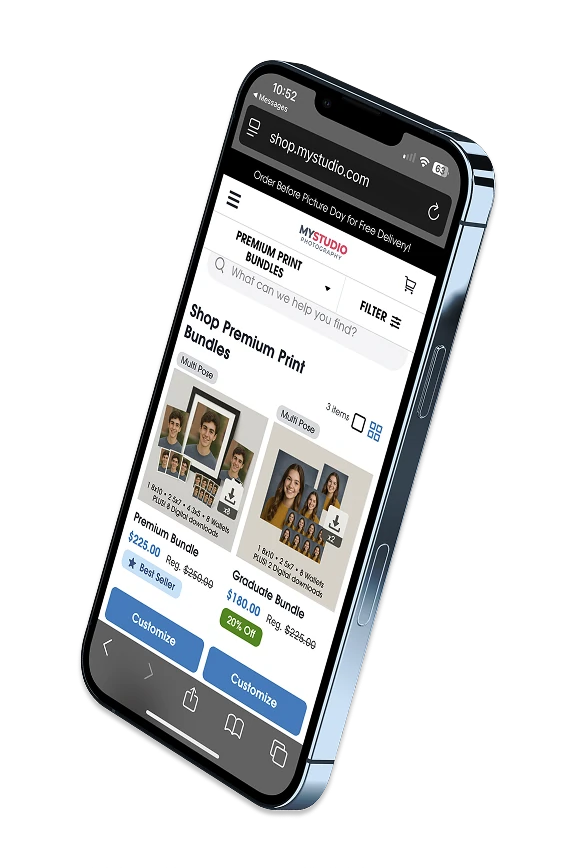
Phone showing a studio shop page of premium print bundles, with promotional prices and badges.

E-commerce Experience (B2C)

I worked across multiple areas of the e-commerce platform focused on helping end customers understand value, navigate options, and complete purchases with confidence.

Key focus areas included:

  • Reducing friction in shopping and checkout flows
  • Clearly communicating promotions, pricing, and incentives
  • Designing flexible systems that adapt to different studio configurations
  • Maintaining consistency across cart, checkout, and order summary views

These experiences required clarity and trust at moments of decision while supporting significant complexity behind the scenes.
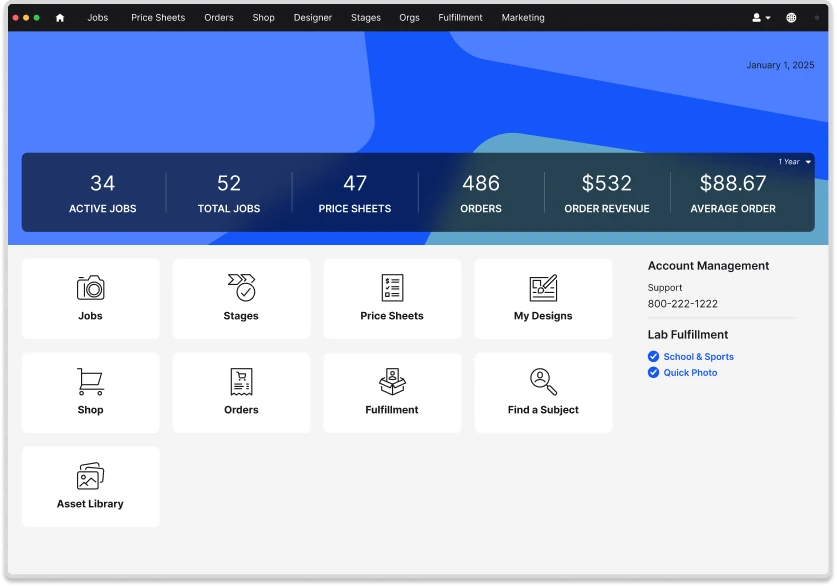
Studio dashboard with totals for active jobs, price sheets, and orders, and tiles for Jobs, Stages, Price Sheets, Shop, Orders, and Fulfillment.

High-Volume Workflow Tools (B2B)

A significant portion of my work focused on internal tools used by studios to manage large volumes of jobs, images, and marketing campaigns, often under tight timelines and operational pressure.

Key focus areas included:

  • Dashboard and table-heavy interfaces optimized for speed and accuracy
  • Configuration-driven systems that scale across studios of different sizes
  • Improving usability within existing technical constraints
  • Preventing errors in workflows that directly impact revenue and delivery

These tools prioritized efficiency, predictability, and error prevention over visual simplicity.

Key problem spaces and system solutions

Preventing Missed Actions in High-Volume Workflows

Problem

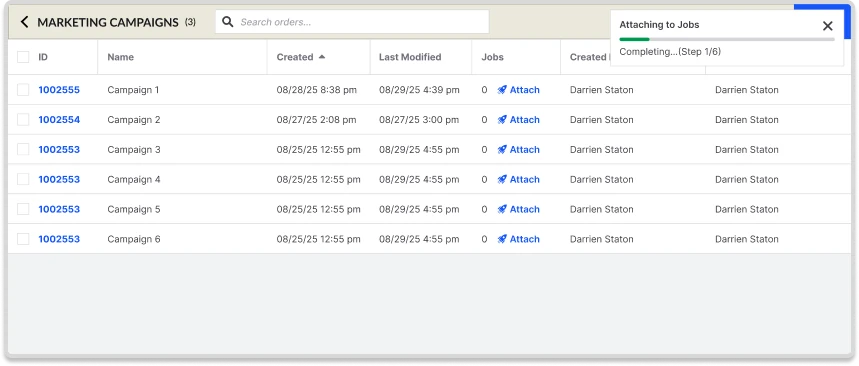
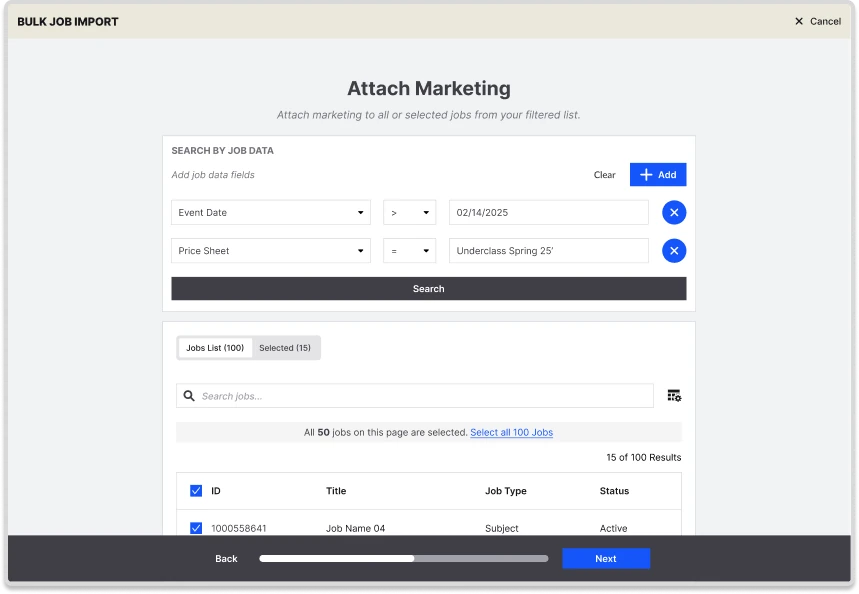
Studios had a hard time remembering to attach marketing to their jobs. Before this work, a marketing specialist had to alert the studio, and the studio then had to open each marketing campaign and manually press send. There was no way to do it in bulk, which made the process cumbersome and easy to miss at scale.

System approach

Instead of relying on reminders alone, I helped design a system that:

  • Made missing actions visible through contextual filters and dashboards
  • Surfaced value and outcomes, not just tasks
  • Reduced repetition by supporting repeatable and batch actions

Shipped examples

  • Marketing Attachment Wizard
  • Job-level marketing filters and dashboards

This approach shifted responsibility from user memory to system affordances, which scales more effectively across volume and experience levels.

Bulk job import screen titled Attach Marketing, with filters for event date and price sheet above a list of selected jobs and a Next button.
Marketing Attachment Wizard
Marketing campaigns table with an Attach button on each row and a progress notice reading Attaching to Jobs, step 1 of 6.
Job-level marketing filters and dashboards

Enabling Safe Customization

Problem

Studios needed the ability to make last-minute changes to marketing content. However, unrestricted editing risked breaking layout, deliverability, and long-term maintainability.

System approach

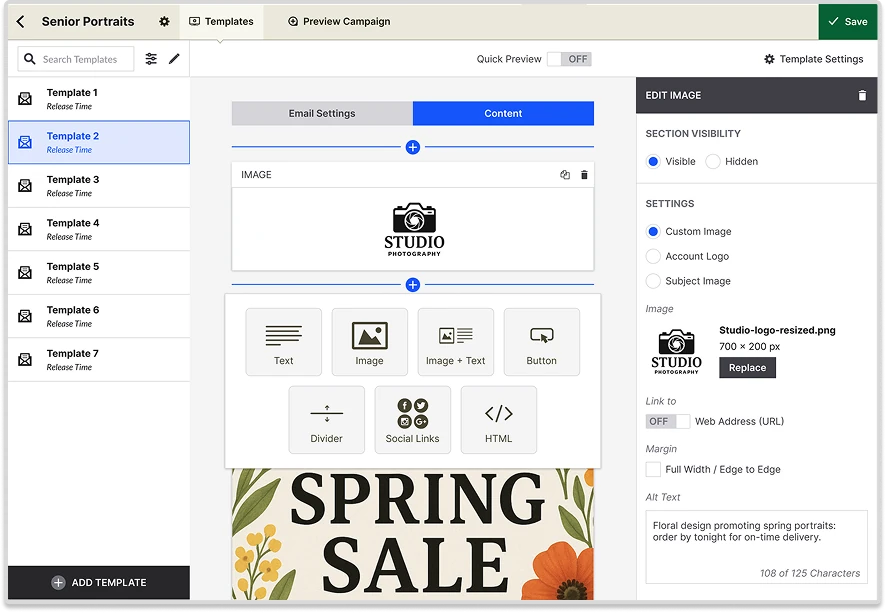
I designed a permission based editing marketing campaign editor that:

  • Explicitly defined editable versus locked components
  • Allowed users to inject dynamic shop links
  • Added alt text for accessibility and missing images
  • Allowed users to preview campaigns in both mobile and desktop view

Shipped example

  • Campaign Designer with editable templates

This balanced autonomy and safety while avoiding exposure to unnecessary system complexity.

Campaign Designer with a list of email templates on the left, the email content with a spring sale image in the middle, and an Edit Image panel with an alt text field on the right.
Campaign Designer with editable templates

Making Incentives and Value Visible at the Right Moment

Problem

Promotional incentives existed within the system but were often invisible or unclear during key decision moments. Studios relied on manual workarounds, and customers struggled to understand what was on sale, for how long, and why it mattered.

System approach

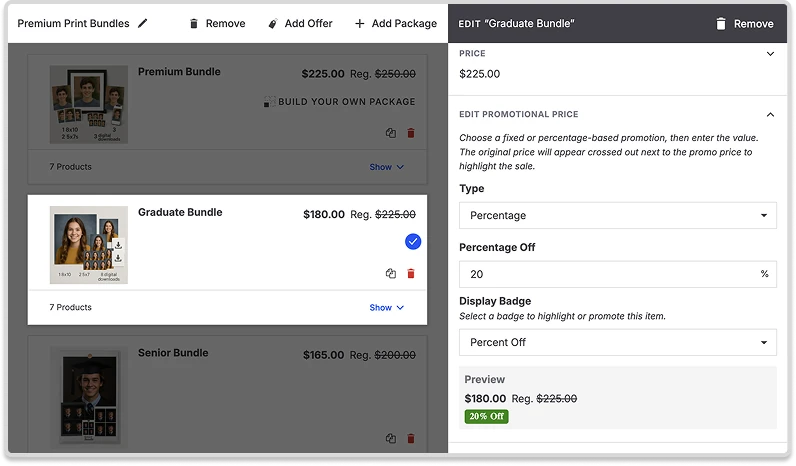
I designed a unified promotional pricing system that:

  • Surfaced incentives directly within the shopping and checkout experience
  • Reinforced promotional context without disrupting the flow
  • Scaled across products, carts, and order summaries through shared patterns

Shipped example

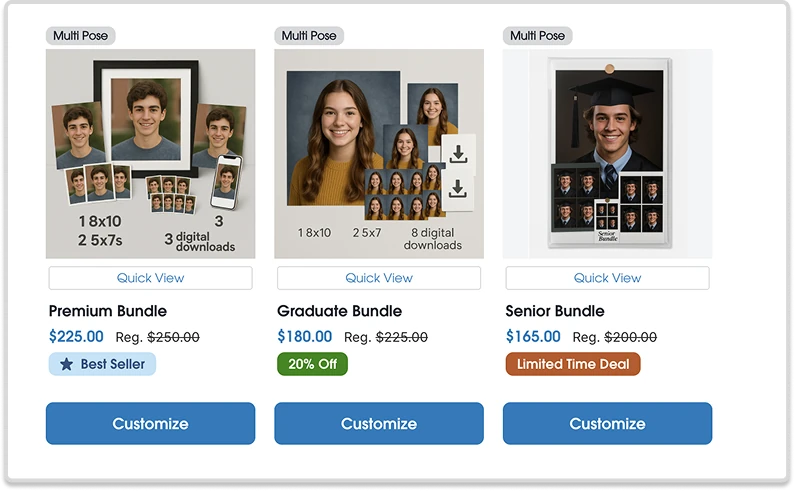
  • Product Badges with Crossed-Out Promotional Pricing

This reduced ambiguity for customers and eliminated the need for fragile naming-based workarounds by studios.

Shop page with three bundles: Premium Bundle at $225 marked Best Seller, Graduate Bundle at $180 marked 20% Off, and Senior Bundle at $165 marked Limited Time Deal, each with the regular price crossed out.
Product Badges with Crossed-Out Promotional Pricing
Price sheet editor for the Graduate Bundle with a percentage promotion of 20 percent off, a display badge setting, and a preview showing $180.00 with the regular $225.00 crossed out.

Automating Repetitive Tasks While Preserving Trust

Problem

Manually sorting large volumes of images does not scale. At the same time, automation must remain transparent and controllable to earn user trust.

System approach

I helped design an AI assisted workflow that:

  • Worked within the existing job and sorting flow
  • Helped photographers match students and identify students missing data
  • Made Commencements and Journey products more useful and effective

Shipped example

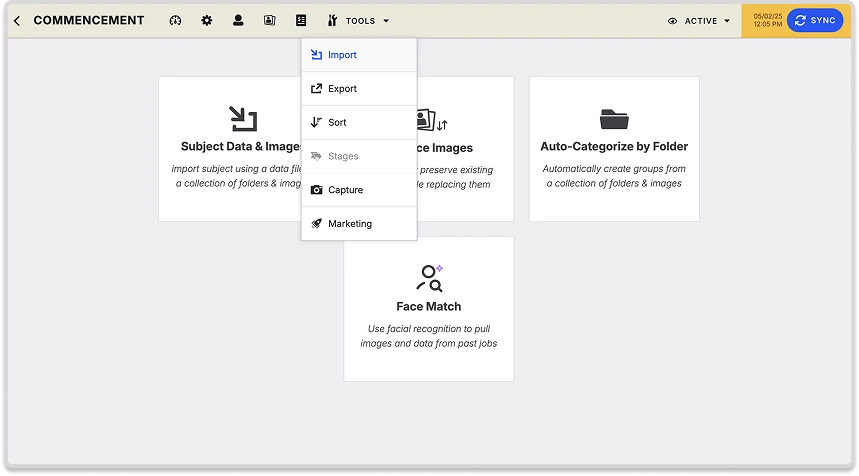
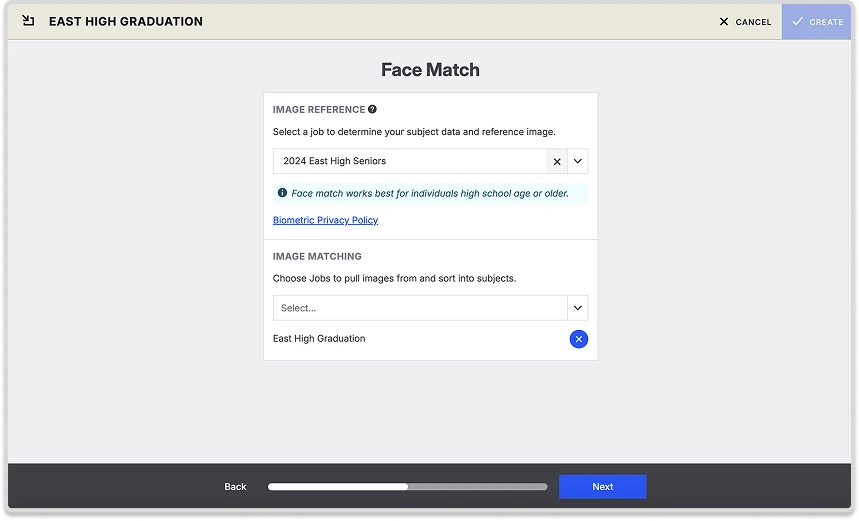
  • Face Match with AI powered image sorting

The design emphasized clarity and user control rather than full automation by default.

Commencement job screen with the Tools menu open, listing Import, Export, Sort, Stages, Capture, and Marketing, above tiles for importing subject data, auto-categorizing by folder, and Face Match.
Face Match setup screen with a reference job selected, a job chosen to pull images from, and a Next button.
Face Match with AI powered image sorting

Supporting Flexible Monetization

Problem

Studios wanted multiple ways to sell digital products, either as standalone items or as add ons, without introducing one off flows or fragmented pricing logic.

System approach

I designed a configuration driven model that:

  • Unified digital and physical fulfillment paths
  • Preserved downstream reporting and financial integrity
  • Allowed future expansion without reworking core workflows

Shipped example

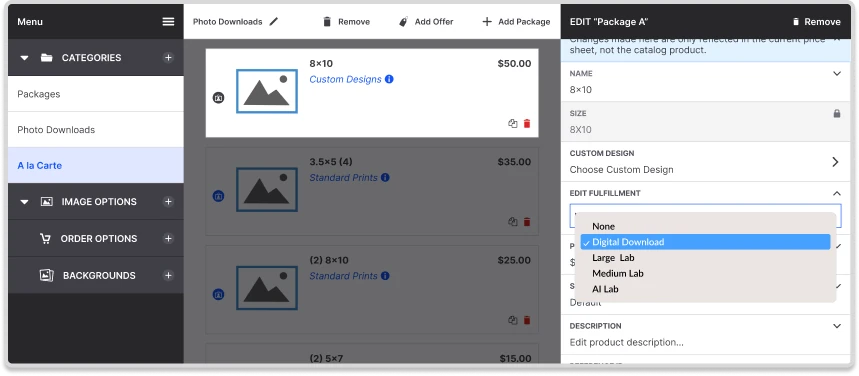
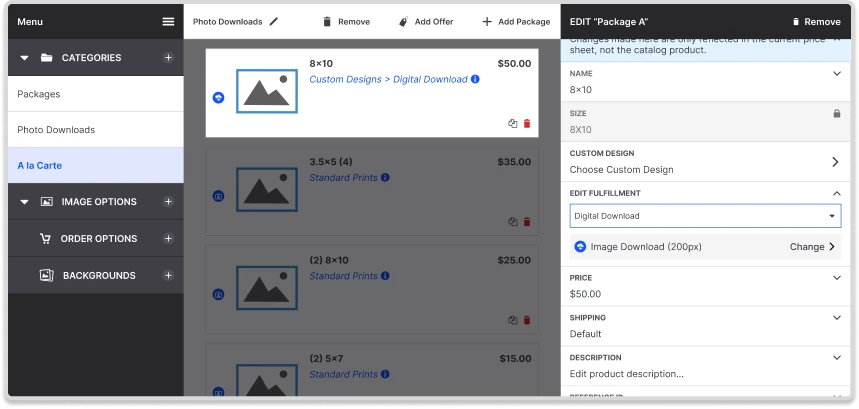
  • Custom Designs offered as digital downloads

This enabled new monetization paths while keeping the overall system cohesive.

Price sheet editor for a package with the Edit Fulfillment dropdown open, listing None, Digital Download, Large Lab, Medium Lab, and AI Lab.
Price sheet editor after choosing Digital Download as the fulfillment, with the package now labeled Custom Designs, Digital Download.
Custom Designs offered as digital downloads

How I think about design

I approach product design as system design.

I focus on:

  • Building workflows that make it hard to do the wrong thing
  • Reducing cognitive load through structure and clear defaults
  • Designing for edge cases and failure states early
  • Long-term maintainability over short-term completeness
  • Treating accessibility as a foundational constraint, not an afterthought

My goal is to design products that scale with both users and the business over time.

Closing remarks

This case study represents a curated snapshot of my work designing scalable systems across both B2C and B2B contexts. While not exhaustive, it reflects how I approach complex, real-world product problems where clarity, scale, and trust are critical.

Thank you!